.jpg)
Dubsado review: Is it worth it for freelancers in 2026?
This article contains affiliate links. If you purchase a tool through them, we may earn a commission — at no extra cost to you. It never influences our rankings or what we recommend.
Dubsado is a client management CRM built for service-based businesses: photographers, coaches, consultants, virtual assistants, and agencies that provide the same (or similar) service to clients.
Essentially, Dubsado is a relationship management system designed to replace repetitive work. Proposals, contracts, invoices, scheduling, and client communication all live in one place.
It's not the only all-in-one CRM built for creatives (HoneyBook is the obvious comparison, and we’ll get to that), but Dubsado offers customization and automation of a different level. But is the depth worth the trade-offs?
In this honest review, we tested Dubsado's core features (after the 3.0 update) and the onboarding process, dug into pricing, and weighed Dubsado vs what service-based business owners actually need day-to-day. Here's what we found.
Quick verdict: Is Dubsado worth it?
Dubsado is a strong pick for service-based businesses (photographers, coaches, consultants) who want deep customization. If you want something simpler out of the box, HoneyBook edges it out, but for workflow control, Dubsado is hard to beat.
If you're managing a real client pipeline, this is the tool worth the time and investment. The free trial is a good way to test the workflow builder, but once you're ready to automate the full client journey, the Premier plan at $55/mo is the sweet spot.
What we liked
Deep customization: branding, proposals, and workflows can be tailored end-to-end
Powerful automation once set up: the Flows builder can run entire client journeys hands-off
All-in-one client lifecycle: proposals, contracts, invoicing, and portal in one system
Strong client portal experience: clients self-serve on payments and questionnaires
What we disliked
Steep learning curve: full complex setup takes hours, but stays forever
Weak mobile app experience
No task dependencies or Gantt charts, thinner project-management layer than some alternatives
None of the cons change the verdict: for service-based businesses ready to systemize client work in 2026, Dubsado is the right CRM.
Client management CRM for service-based businesses — proposals, contracts, invoicing, and automation in one place.
What Is Dubsado?
Dubsado is a client relationship management (CRM) platform built for service-based businesses, not sales teams or enterprise pipelines. It’s designed for freelancers and small business owners who manage clients via a repeatable process: inquiry, proposal, contract, invoice, delivery.
Essentially, Dubsado replaces all the different tools you accumulate to manage clients: a scheduling tool, a contract e-sign tool, a separate invoicing app, and email threads to track it all.
Instead, the entire client lifecycle runs through one system: lead capture forms, questionnaires, proposals, contracts, invoicing, scheduling, and automated workflows that trigger based on where a client is in the process.
It's built by and for creatives and service providers: photographers, coaches, consultants, and virtual assistants make up much of its user base, which shows in how customizable the branding and templates are. Dubsado gives you the tools to build a client experience exactly how you envision it.
Key features
Dubsado packs a lot into one platform, and you won’t need every single feature, at least not at the start. Here's the breakdown of what actually matters: from client-facing tools like the portal and proposals, to the automation and integrations.
Lead capture, questionnaires, and onboarding
Before a client ever sees a proposal, Dubsado captures them through customizable lead capture forms. You can embed them directly on your website or share via a link.
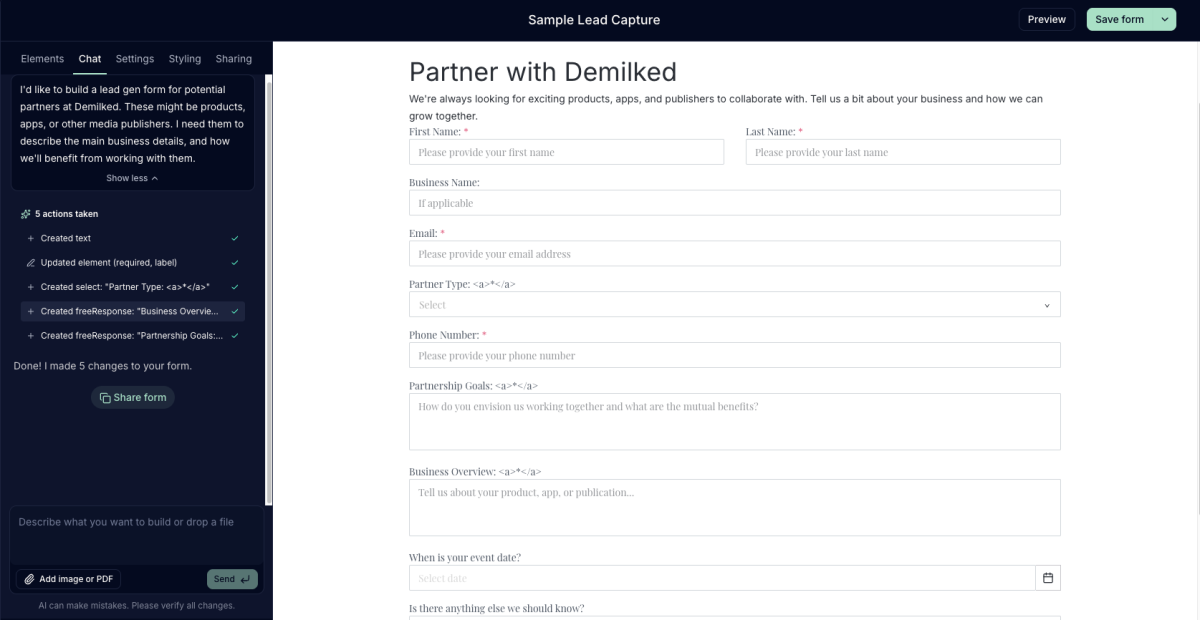
Questionnaires go a step further, letting you build out detailed intake forms tailored to your service. A wedding photographer might ask about venue and timeline, while a business consultant might ask about team size and current tools.
What we liked in this feature is complete customizability and the option to chat with AI instead of building everything by hand. Everything is fully customizable, so you're not stuck with generic fields that don't fit your business.
Well-built lead capture forms filter out mismatched inquiries before they eat up your time, so by the time a lead reaches the proposal stage, you already know they're a fit.
Proposals, contracts and templates
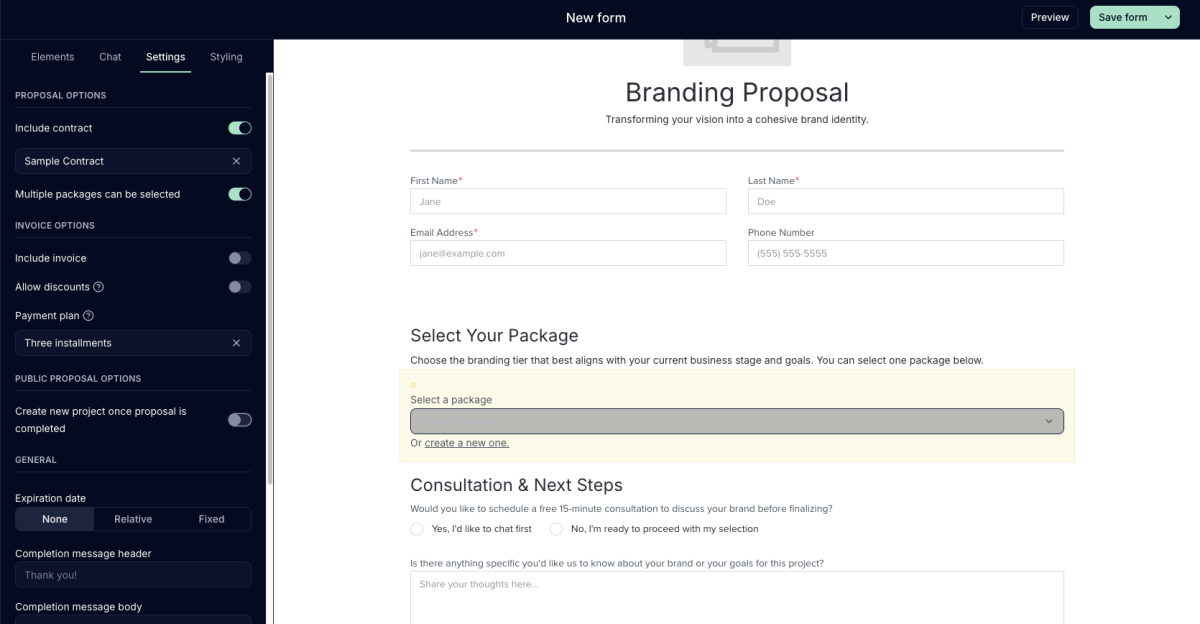
Dubsado's proposal builder is one of its most well-reviewed features, and we understand why. You can design visually polished proposals, bundle in your contract, and let clients review and sign both in one flow.
Like most features in Dubsado 3.0, you can simply chat with AI and let it generate the right proposal for you, and then adjust as necessary.
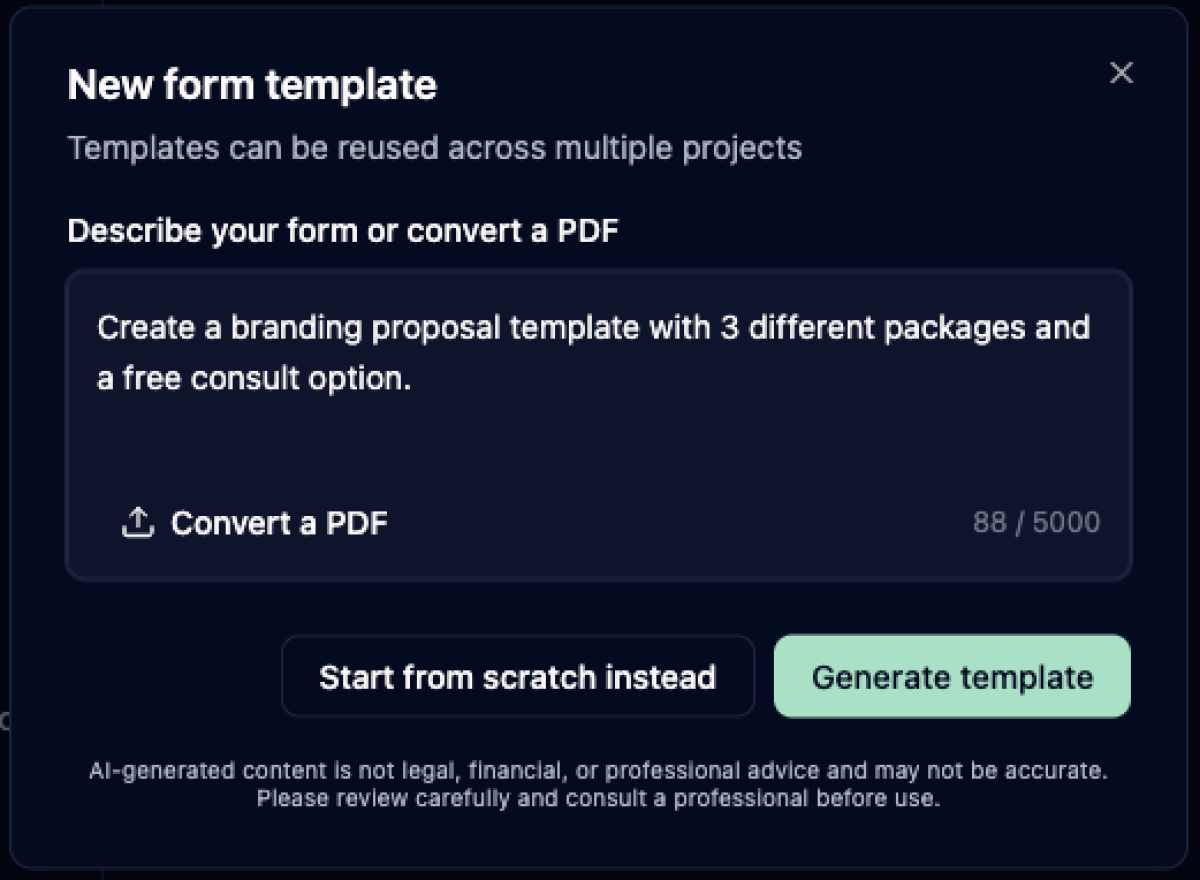
According to our testing, templates are the biggest time-saver. You only need to build a perfect proposal template once, and you can reuse it for every future client. The same applies to contracts.
Clients can review, ask questions, and sign directly inside their portal, and the proposal-to-contract handoff happens without you manually sending a second document. We were able to merge the proposal, contract, and next steps into one motion.
Invoicing and payments
Invoicing is in the same flow as your proposals and contracts. Once a contract is signed, an invoice can trigger automatically, so you don't need a separate app or manual entry.
Dubsado supports major payment processors, including Stripe, and offers ACH transfers with lower transaction caps than lighter competitors. Fees pile up with bigger or more clients, so that’s worth knowing.
Clients pay directly through their portal, and payment status updates automatically, so you don't have to chase confirmation emails. We especially liked that you can customize a payment plan and add periodic payment reminders.
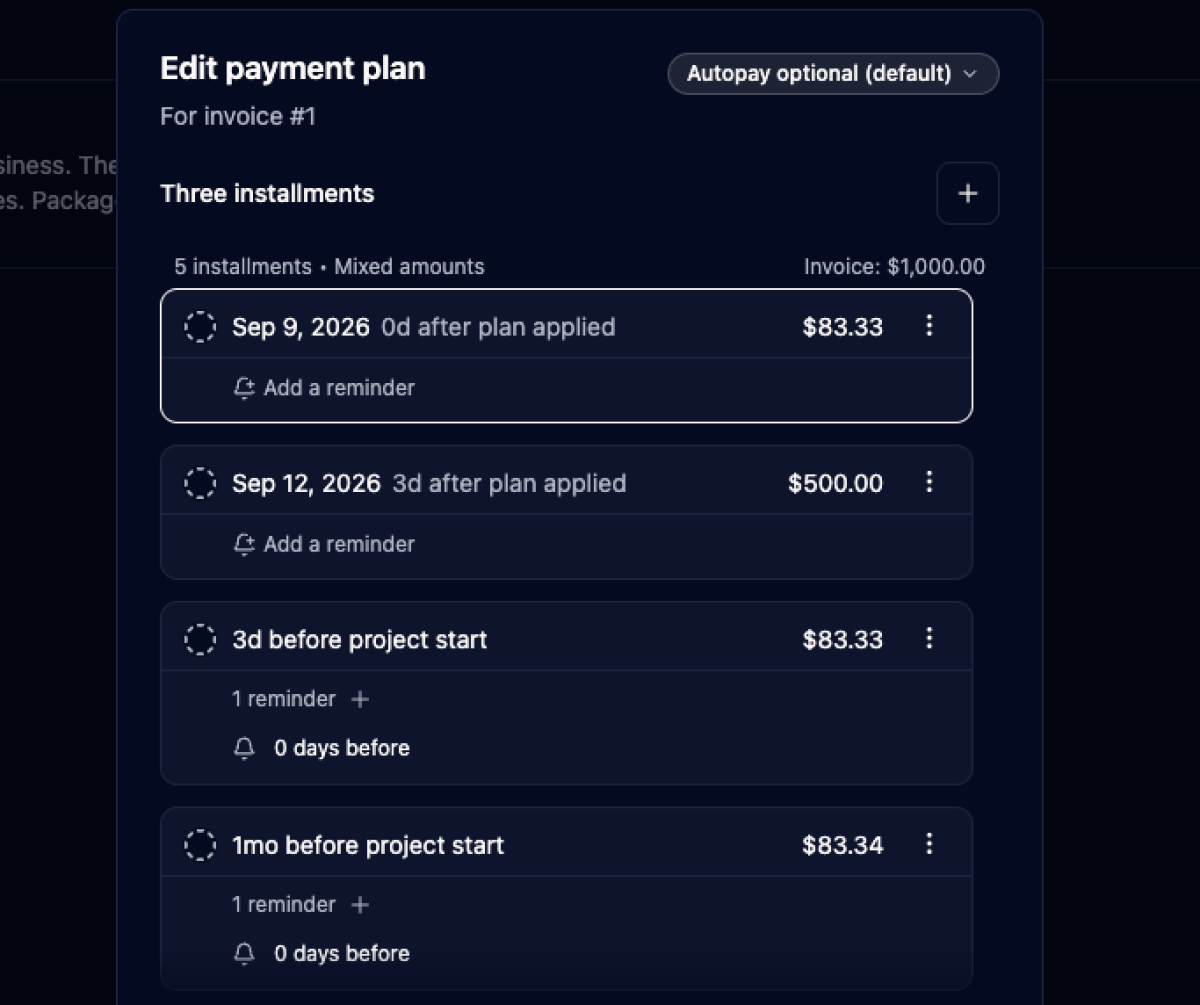
For businesses that bill recurring retainers or multi-installment projects, you can build payment plans into the same invoice, spreading out collection without extra manual follow-up.
Scheduling and task management automation
Dubsado includes a built-in scheduler, so clients can book calls or sessions directly based on your available time slots. You don’t need a separate scheduling tool for basic booking.
Task management exists, but it's lighter than dedicated project management tools. You can assign action items tied to a client's workflow, but there's no Gantt chart or task dependencies for more complex projects.
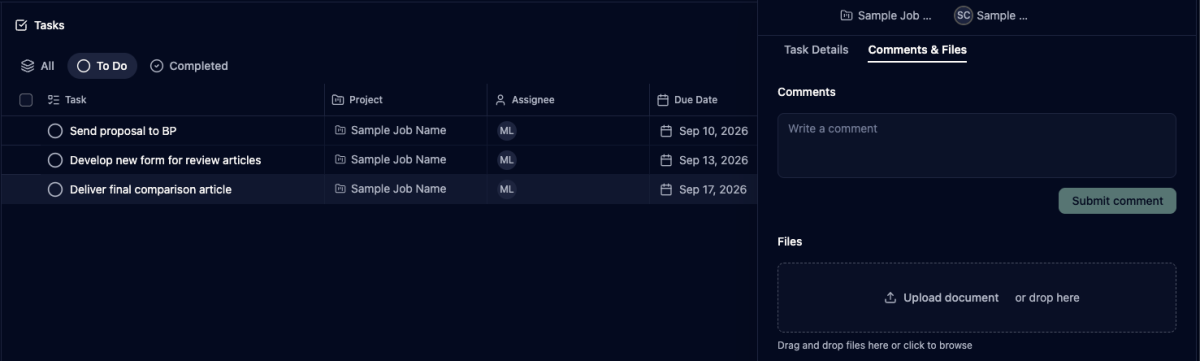
For solo service providers with straightforward client work, this is more than enough. For teams working on interdependent tasks across projects, you'll likely still want a dedicated PM tool alongside Dubsado.
Canned emails and client communications workflow
Canned emails let you streamline frequently sent messages, like a follow-up after a discovery call, a mid-project check-in, or a thank-you after final delivery. You don’t have to retype them or even copy-paste them: Dubsado allows you to send emails and messages with a click.
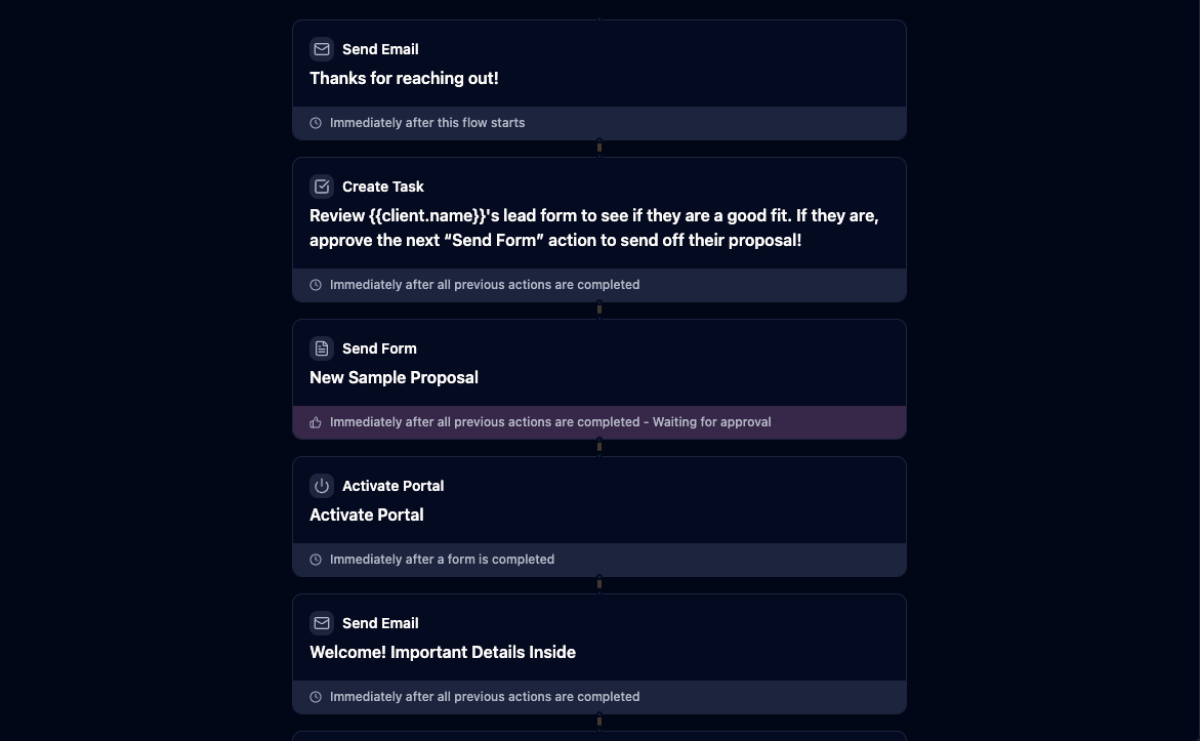
This pairs directly with the workflow automation: canned emails can be triggered automatically at specific stages, or sent manually when you want a personal touch without starting from a blank page. Either way, it keeps your client communication consistent in tone and timing across every relationship you manage.
Is Dubsado the best CRM for your service-based business?
Dubsado’s main angle is the all-in-one CRM, and for the most part, we agree. Client management, proposals, contracts, invoicing, and workflows all work together. As a freelancer, you only have one tool (and bill) to help you in your day-to-day.
That said, “all-in-one” comes with a “but.”
Dubsado isn't a project manager in the traditional sense. It doesn't offer dependency mapping or multi-person tasks. If your business is mostly solo client work with custom workflows built around your own process, this won’t matter. But if you're coordinating a team and multiple projects, this is a big missing part.
Compared to other CRMs in this space (HoneyBook vs Dubsado is the comparison people ask about most), Dubsado leans further into customization and automation depth, but it’ll take time to set up.
Zapier support fills most of the remaining gaps, connecting Dubsado to whatever your existing stack already runs on. And if new features roll out (Dubsado's team ships updates regularly), they tend to build on that same "customize everything" philosophy rather than simplifying it.
The pros and cons of Dubsado really come down to one tradeoff: hours of setup in exchange for a fully automated system in the future.
Dubsado pricing
Dubsado offers two plans: Starter at $35/month and Premier at $55/month (both cheaper when billed annually).
Starter covers the basics: client portals, invoicing, templates. Premier unlocks the automation this review is really about: workflows, scheduling, public proposals, and Zapier integration.
If you want the automated workflows we covered earlier, Premier is the plan to test. Starter caps you at one active lead capture form and locks automation out entirely. No per-client fees on either tier, so cost doesn't creep up as your roster grows.
Both plans include a free trial.
Starter | Top pick Premier | |
|---|---|---|
| Price | $35/mo ($335/yr) | $55/mo ($525/yr) |
| Best for | Basic client management | Automation & scaling |
| Client portals, invoicing, templates | ✅ | ✅ |
| Lead capture forms | 1 active | Unlimited |
| Automated workflows | ❌ | ✅ |
| Scheduling | ❌ | ✅ |
| Zapier integration | ❌ | ✅ |
Annual billing saves ~20% on both plans.
Final verdict
Dubsado takes work to set up. But once it's running, your client process runs itself. The customization and automation are genuinely best-in-class. The learning curve and dated UX are real downsides. Still, for freelancers ready to systemize client work, Dubsado earns its spot as one of the top CRMs out there.

Mia is a tech writer and editor with 5+ years of experience. She's helped SaaS products shape their story, then turned around to test and rank the tools they build. At Demilked, she cuts through the noise to tell you what actually saves you time, money, and energy, so you can pick the right tool on the first try.